Up to 50% OFF
Variations
When you select a layout, the Presentation Builder The Presentation Builder lets you generate or edit AI text, add slides, adjust theme colors, and download your PowerPoint file (works in Google Slides). opens so you can customize the slide and download your PowerPoint file. Watch tutorial
Download the PNG image from PresenterMedia. In PowerPoint, go to Insert → Pictures → This Device, and select the clipart file. You can resize or move it anywhere on the slide.
Yes. Upload the PNG file to your Google Drive, then insert it in Google Slides by going to Insert → Image → Drive. Adjust the size and position as needed.
Yes. Many PresenterMedia clipart images are editable. Use the built-in clipart variations customizer or the advanced settings to change colors before downloading the image to match your theme.
PNG is recommended for clipart because it supports transparency and maintains image quality. It works well in PowerPoint, Google Slides, and most other apps.
Yes. With an active PresenterMedia subscription, you can use downloaded clipart commercially in presentations, marketing materials, and client projects. See our License Agreement for more information.
This clipart image may be included in our free clipart section. We offer a limited selection of clipart for free so you can try them and see if they fit your design workflow. Visit the Presentation Clipart page and find free clipart graphics marked with a green arrow in the top-right corner of each preview thumbnail.
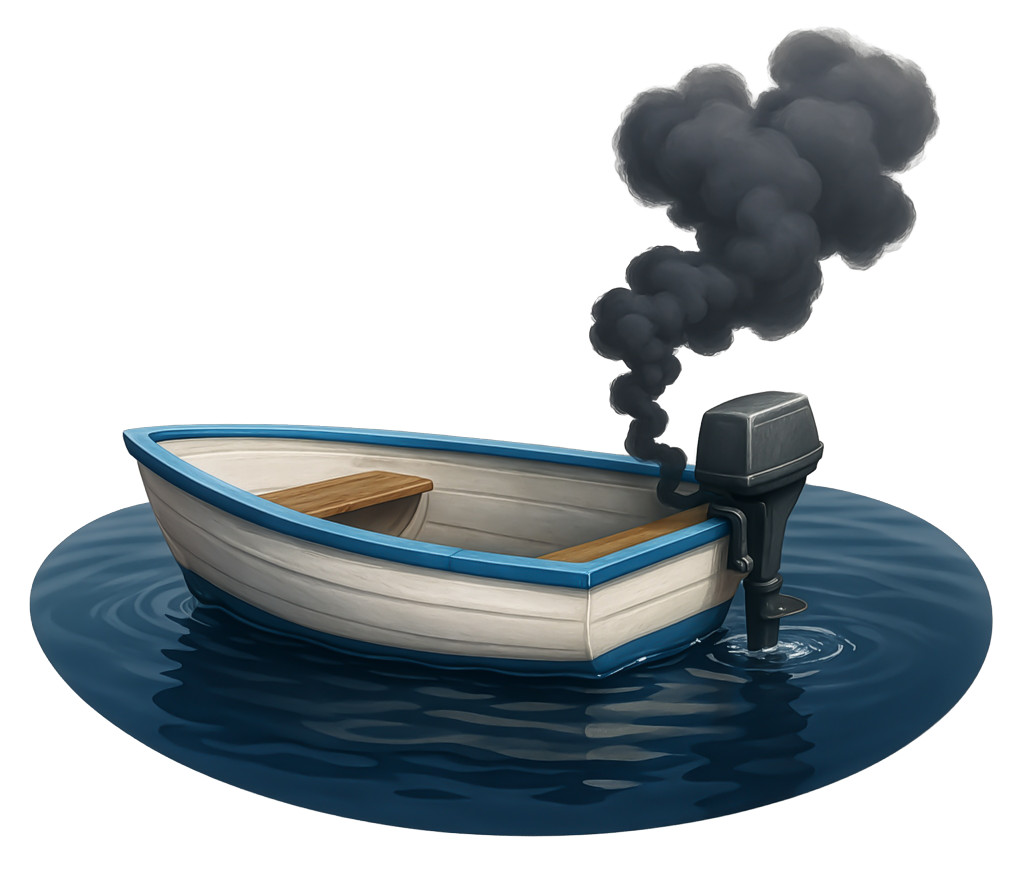
This expressive clipart features a small boat stalled on the water with thick black smoke rising from its motor, clearly symbolizing the idiom "dead in the water." The boat’s classic blue trim and wooden interior create a relatable, real-world scenario where movement has stopped completely. This visual instantly conveys themes of failure, halted progress, or plans that have come to a complete standstill, making it powerful for presentations about obstacles, setbacks, or stalled momentum.
You can easily incorporate this presentation clipart into a slide in one of our PowerPoint templates to reinforce messages about challenges or stalled progress. Explore more expressive visuals in our Presentation Clipart collection.
The smoky, motionless boat creates an immediate emotional connection by tapping into familiar feelings of frustration, overwhelm, or inability to move forward. This visual helps your audience quickly understand and relate to moments of stalled progress, making your message more impactful on both a personal and emotional level.
Adding this PNG presentation image to a slide in one of our PowerPoint templates helps reinforce the seriousness of stalled progress and invites your audience to reflect on solutions. The dramatic smoke and still water make the message visually clear and memorable.
To insert the clipart into PowerPoint, simply download the PNG and click Insert → Pictures to place it on your slide. For Google Slides, click Insert → Image → Upload from computer. The transparent background ensures clean, seamless placement, making it easy to use PNG images in PowerPoint or insert PNG images in Google Slides without distracting edges.
idiom, stalled, failure, obstacle, challenge, slowdown, frustration, setback, boat, metaphor
Similar Templates and Designs
© 2009-2025 Eclipse Digital Imaging, Inc.
Quality PowerPoint Templates, Animations, videos, and 3D Clipart.
PowerPoint® is a registered trademark
of Microsoft Corporation.